Controller to OSC
Overview
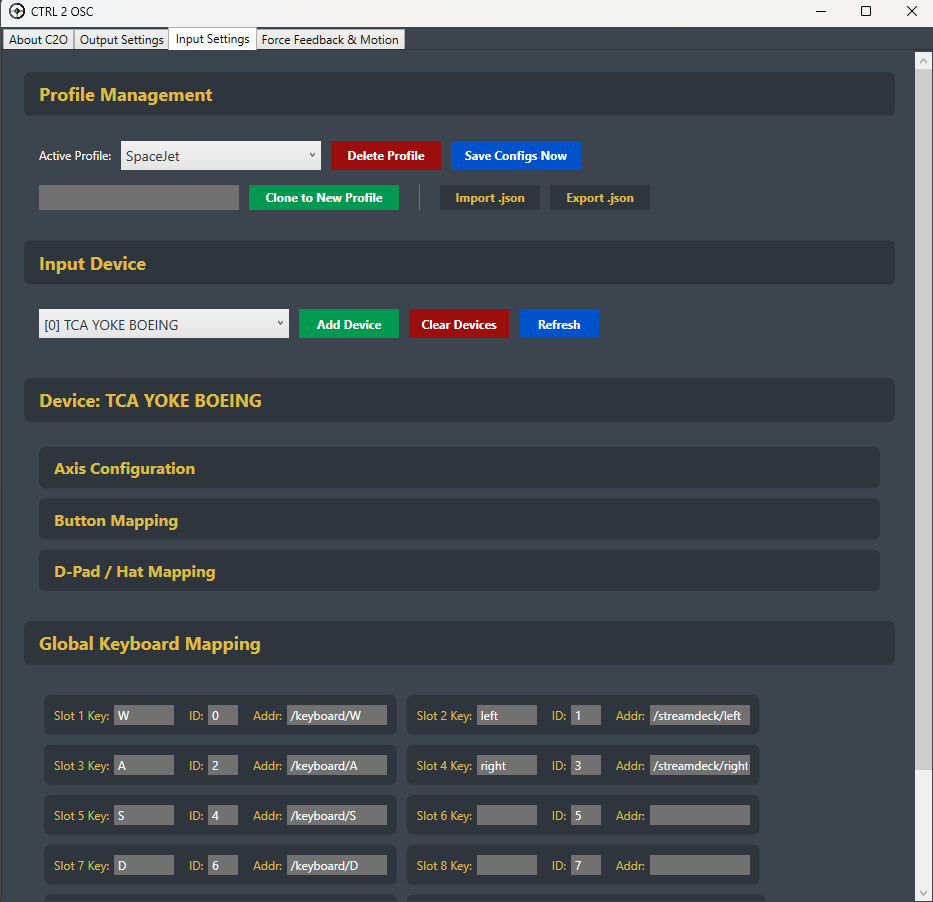
CTRL 2 OSC (C2O) is a lightweight, GUI-driven application designed to seamlessly bridge the gap between physical hardware and digital environments. Originally developed as a versatile solution for mapping physical simulation hardware to Massive Loop, C2O has evolved into a robust C# application. It reads real-time data from USB steering wheels, Bluetooth gamepads, joysticks, and keyboards, translating and broadcasting these inputs over a local network using the Open Sound Control (OSC) protocol for low-latency communication.
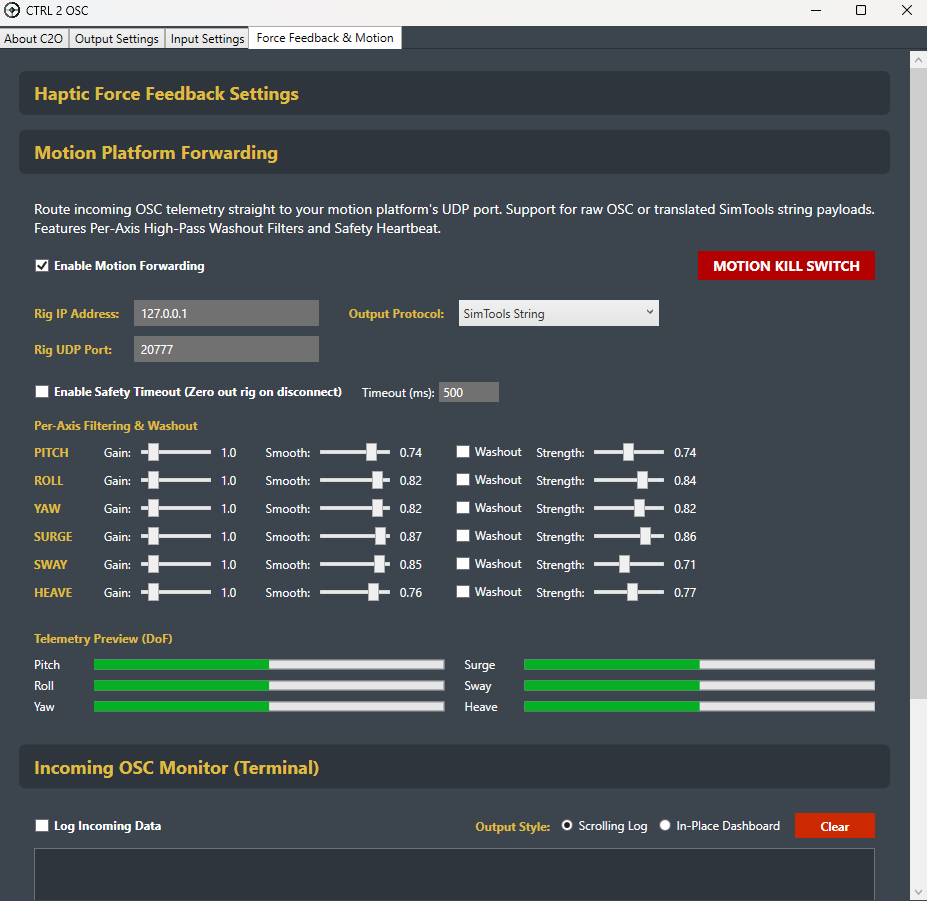
Beyond input mapping, C2O V3.3 features powerful two-way OSC communication. It allows remote software to send Force Feedback (FFB) commands to adjust steering wheel resistance in real-time, and it now acts as a dedicated Motion Platform Forwarder, receiving 6-DoF telemetry and routing it to physical motion rigs.
Showcase
Video
Key Features
- Multi-Device & Keyboard Support: Capture inputs from multiple hardware devices simultaneously, or map global keyboard keystrokes directly to OSC outputs.
- 6-DoF Motion Platform Forwarding: Route incoming OSC motion telemetry (Pitch, Roll, Yaw, Surge, Sway, Heave) directly to physical motion rigs. Outputs can be translated to Raw OSC, SimTools Strings, or a vJoy virtual joystick.
- Two-Way OSC (Hardware FFB): Supports incoming OSC messages to control Centering Spring, Damper (Weight), and Static Friction on compatible steering wheels, complete with a built-in FFB Clipping Monitor and custom testing tool.
- Advanced Axis Tuning & Washout Filters: Fine-tune physical controls with adjustable deadzones and non-linear curves. Motion platforms benefit from custom Exponential Moving Average (EMA) smoothing and adjustable High-Pass Washout Filters to keep rig movements natural.
- Rig Safety Protocols: Features a dedicated Motion Kill Switch and a customizable Safety Heartbeat timeout that automatically zero-outs rig telemetry if the network connection drops.
- Customizable Routing & Auto-Detection: Automatically detects device types while allowing users to override network routing entirely with custom addresses on a per-axis, per-button, or per-key basis.
Development Highlights
- High-Performance Polling Architecture: Implemented multi-threading to dedicate a separate, high-speed loop purely for hardware polling and OSC broadcasting, keeping the UI fully responsive.
- Dynamic UI Adaptation: Built a modern, Azure TTK-themed interface with real-time visualizers that automatically adapt to the connected device. Buttons, axes, and keys dynamically glow upon activation.
- Bandwidth Optimization: Engineered the output stream to only broadcast values that have changed since the last frame, significantly reducing network load.
- Input Profile Management: Created a robust configuration system allowing users to save and load different device layouts, tuning parameters, and network configurations to a local JSON file.
Technologies Used
- C#: Primary application language.
- WPF (XAML): Rendered the modern GUI theme, dynamic previews, and layout architecture.
- SDL2: Handled underlying USB device polling, input event loops, and Force Feedback (haptics) drivers.
- CoreOSC: Formatted, transmitted, and received UDP network packets asynchronously.
- vJoy: Bridged motion telemetry outputs to virtual joystick drivers via system DLL imports.
My Role
- Tools Programmer
- UI/UX Implementation
Challenges and Solutions
- Ensuring Low-Latency Performance with a GUI:
- Challenge: Polling USB hardware at high speeds while rendering a dynamic GUI can cause thread blocking and latency.
- Solution: Utilized multi-threading to isolate the high-speed input polling and OSC broadcasting loop from the main UI thread. Added an option to switch from a scrolling log to a static in-place dashboard to further reduce UI rendering overhead.
- Handling Hardware Fragmentation:
- Challenge: Different controllers and racing wheels output raw data in wildly different formats and scales.
- Solution: Developed a smart auto-detection system that normalizes raw inputs and maps them to true hardware labels. Added an advanced axis tuning layer so users can manually apply deadzones and smoothing to erratic hardware.
- Implementing Real-Time Force Feedback:
- Challenge: Sending haptic feedback from a digital environment back to a physical wheel requires listening for commands without interrupting the outbound stream.
- Solution: Set up an asynchronous listener loop for incoming OSC messages to adjust the wheel’s Spring, Damper, and Friction in real-time using SDL2’s haptic drivers.
- Ensuring Motion Platform Safety:
- Challenge: Forwarding raw network telemetry to physical 6-DoF rigs can result in violent, unexpected movements if the data spikes or the game crashes.
- Solution: Engineered a high-pass Washout Filter to return the rig to center smoothly, alongside an auto-zeroing safety heartbeat timeout and a dedicated UI Motion Kill Switch to instantly halt rig movement.